Menu

Show posts

This section allows you to view all posts made by this member. Note that you can only see posts made in areas you currently have access to.

Show posts Menu

Messages - BaconXBits

#1
The Gallery / Presidential Showdown
May 10, 2009 08:19 AM

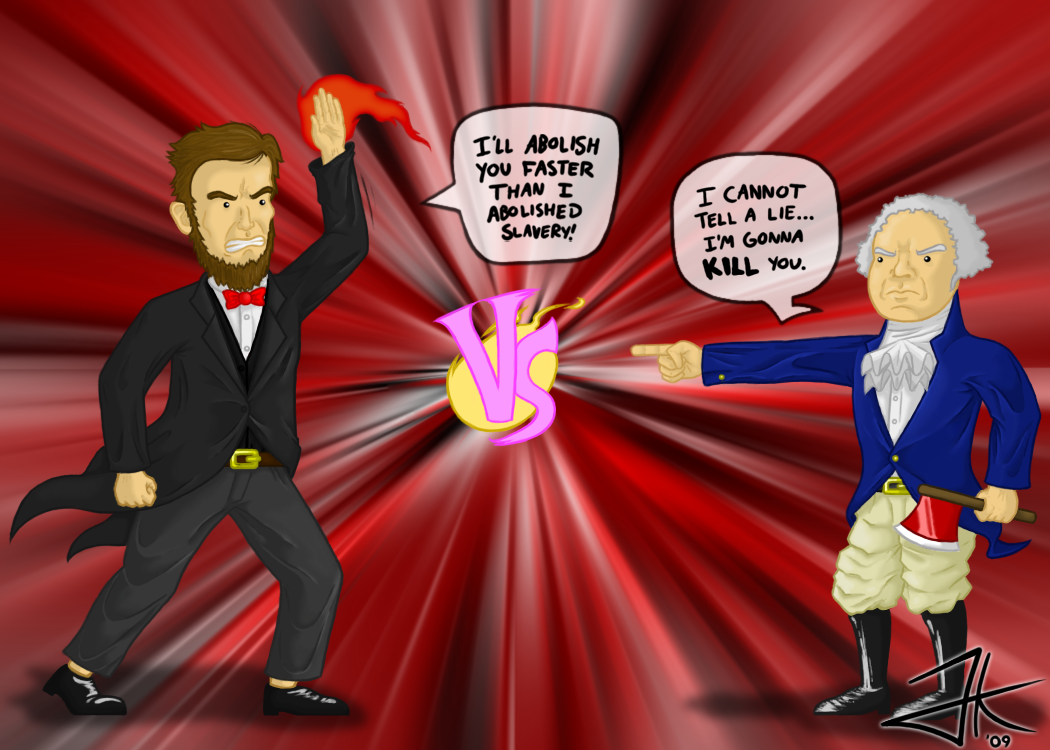
http://baconxbits.deviantart.com/art/Presi...wn-v2-122029820
http://www.sheezyart.com/art/view/2064415/

This is what happens when I'm bored in my Economics class. I saw a picture of some old (probably dead now) dude in some fancy pants suit, so I decided to draw this. I used money as a reference for Washington's face, but everything else is completely freehand. None of that proper anatomy bullshit all the cool kids do.

Either Photoshop drawings are SUPPOSED to take 25+ hours to make, or I'm doing something horribly wrong.

Feel free to watch me on DA too :B

Original pencil drawing here (oh god):
http://i42.tinypic.com/abbba.jpg

#2
General / Help with advanced Flash buttons!
April 19, 2009 05:50 AM
Quote from: f0dmake sure you put this code in not just the first frame of your movie, but the first frame of every scene
AHA!  Problem solved!  I ran into an issue with the flash stopping upon hitting the buttons after taking your advice, but I applied my newly-acquired AS mastery and added a "play();", and now everything's working perfectly.

Thanks to everyone who helped me out, I'll be sure to do a special thanks section for all you cool dudes (not that it means much but hey I'm grateful)

Edit: Is there by any chance a way to keep subtitles off throughout the following scenes if they've been toggled off?  They reset back to "on" upon arriving at the next scene.
#3
General / Help with advanced Flash buttons!
April 18, 2009 02:56 AM
Quote from: ThorIt shouldn't be hard at all.

button.onRelease = function()
{
nextScene();
}

and the command for the other one should be prevScene();

again, give the buttons the proper instance names and paths and it should work perfectly

[edit] also I only have flash 8 so  I  can't open any of the other .flas in here (i.e. I can't see what code you're using)[/edit]


I'll try out your suggestion sometime in the near future.

Below is a Flash 8 .fla of my buttons.
#4
General / Help with advanced Flash buttons!
April 17, 2009 03:55 AM
So, am I correct to assume that with the way I'm doing things, making functioning scene control buttons would be near-impossible?  Being the picky/stubborn fuck I am, I'd rather just dump those two buttons, and/or do simpler ones in the upper right corner or something.
#5
General / Help with advanced Flash buttons!
April 15, 2009 01:38 AM
Quote from: Thor...actually there's a third way which may be easier to do than both of those. On the MC of the subtitle clip, attach a dyanamic text box about here (or anywhere)


The code for this one should be REALLY EASY too:

var toggleSubtitle:Boolean = false;
if(toggleSubtitle)
{
movieClip.textBox.text = "ON";
}
else {
movieClip.textBox.text = "OFF";
}


or something like that. It's been a while since I've coded anything
Bah, I can't get it to work properly, I tried putting that code on all of the movie clips in my button, to no avail.  Is there some prerequisite thing I have to do (like giving it an instance or something)?

And reposting my current problem in case anyone misses it:
What seems to be happening (tested in every scene):
PREVIOUS SCENE: gotoandstop Preloader
PAUSE: Works perfectly!
PLAY: Works perfectly!
STOP: Works perfectly!
NEXT SCENE: gotoandstop Menu

Scene setup:
Preloader (1 frame)
Menu (animated and later halted with a stop(); )
Scene 1
Scene 2
Scene 3

This is kinda weird because the AS codes seem to be fine, but I wouldn't bet on it because I don't know what's with this "parameters" business.  Sorry to be such a novice at ActionScript!
#6
General / Help with advanced Flash buttons!
April 8, 2009 02:14 AM
Quote from: JoelasticotAs you guessed, the problem with the buttons not working was that the actions were "sent" to the nearest timeline, which is the timeline of the movie clip in which they are nested. To resolve this issue, we add the prefix "_root." to actions we want to be executed on the main timeline. However, this causes scene actions not to work because using _root. makes flash treat the timeline as a movie clip, and movie clips don't have scenes. I've created a simple function that will do the scene control in your movie, so here's the fla. All the code is explained. I haven't tested it much though, so if you encounter any problems, let me know

[attachment=2773:Movie_Control_2.fla]
Aha!  I understand now.  Thanks a ton for the help, I'll PM you or update this thread if I run into any issues.


Edit: Uh oh, some of the buttons aren't working as well as I would like them to!

Here's a diagnosis of what seems to be happening:
PREVIOUS SCENE: gotoandstop Preloader
PAUSE: Works perfectly!
PLAY: Works perfectly!
STOP: gotoandplay Menu
NEXT SCENE: gotoandstop Menu

Scene setup:
Preloader (1 frame)
Menu (will be animated and later halted with a stop(); )
Scene 1
Scene 2
Scene 3

This is kinda weird because the AS codes seem to be fine, but I wouldn't bet on it because I don't know what's with this "parameters" business.  Sorry to be such a novice at ActionScript!
#7
General / Help with advanced Flash buttons!
April 5, 2009 11:35 PM
Big fat update.

So here's an update on what's working:
-The Subtitles button works flawlessly, tested and everything.
-The ANIMATIONS on the movie control menu (but the buttons themselves don't actually work).

What's left to be resolved (in order of urgency):
-Making the buttons actually serve their intended function.  For some reason, the quality buttons work perfectly, but all of the other ones just repeat the "over" animation of the movie control menu (except for the "Pause" button, for reasons I do not understand).  This confuses me because they're made exactly the same, with the same layers, frame setup, and same everything.  I tried doing the movie clip button inside a movie clip thing for the "Previous Scene" button (the method Joelasticot gave me), and it has the same result as the other buttons.  My best guess is that the buttons don't work because they think that I want them to perform their actions within the movie clip they are in, and not in the main timeline.  Any code that would make those buttons apply to the main timeline would basically fix my problem.
-Is there any way to not have the movie control/subtitles buttons play their "up" animation at the beginning of a scene?  Currently I have the alpha set to 0% at the beginning of each scene, and then to 100% on the frame that the button animation ends.  I see this as a minor problem, as the buttons would be unavailable/invisible for 11 frames.
-How would I go about displaying the status of the subtitles (on/off) for a short time before fading?  This isn't necessary but it'd be nice to have.

Here's an updated preview of my buttons:

Note that the "Previous Scene" button was made differently from all of the other ones (using a repeating method of the way I made the subtitles button).  Also take my word for it when I say that the former 5 buttons don't work, as there are no scenes or frames to test them on in this swf.

And here's a .fla if it helps.

Quote from: Rob HalfordK, so I'm back.

If you want it in AS3, I'm all ears.
I'd rather not; I prefer to have everything in AS2 since I know literally nothing about how AS3 works.
#8
General / Help with advanced Flash buttons!
April 5, 2009 03:55 AM
Thank you very much, you're a hero!  I didn't even know you could make buttons out of movie clips and ActionScript.  I'll try to work things out to see if I can get everything working properly.

Edit: See below.
#9
General / Help with advanced Flash buttons!
April 4, 2009 02:17 AM
So I'm making a new movie interface for all of my future movies, and I'm having trouble on the bottom ones in particular.  The subtitles button (top left) works well, but I can't quite say the same about the movie control bar (bottom left)


You can see what the movie control animations are SUPPOSED to look like by hovering over a non-button part of the hitbox (eg far right).  I haven't bothered doing the LMH buttons yet because I'm probably doing something horribly wrong.

Summary of what I need help on:

SUBTITLES:
-Making the button not repeat the "over" frame upon being clicked.  This solution would probably be applied to the movie control bar as well.

MOVIE CONTROL BAR:
-Preventing the main button's "over" animation from repeating upon hovering or clicking on the smaller buttons.

NOTES:
-I haven't used any ActionScript except for stop(); at the end of EVERY "over" movie clip.
-As far as I know, I haven't made any retarded mistakes such as neglecting to put stop(); at the dne of a movie clip.

Also here's a picture of my library so you get a slightly decent image of what's going on in my intricate clusterfuck of a button (the MC stands for "Movie Control," not "Movie Clip"):


For each button, I basically just have it glow (non-animated) and have a graphic describing the button's function tween upwards (Prev. Scene, Play, etc.), stopped by a stop();.  The only time I convert something into an actual symbol is if I need to animate within it (MC) or apply a filter (also MC).  The button descriptions are grouped vectors (CTRL+G'd).

Any solutions or alternatives that would achieve a similar effect would be appreciated!

If anyone wants me to send them the .fla hit me up on MSN or I can upload it.
#10
The Gallery / Tuxedo Snake Man vs. Squidman
October 13, 2008 01:41 AM
Quote from: Squeefstop putting that gay smiley face for the 0's in 2008 or ill fucking kill you

but yeh nice shading
no guarantees until 2010
#11
The Gallery / Tuxedo Snake Man vs. Squidman
October 12, 2008 07:17 PM
Quote from: Davebutgug
And the shadowing on the tail of tuxedo man seems not right.  Damnit Now I cant stop thinking of The Grim Adventures of Billy and Mandy.  Or at least I think thats where its from.
I made these guys up, but some inspiration may have subconsciously came from TGAoB&M.
#12
The Gallery / Tuxedo Snake Man vs. Squidman
October 12, 2008 08:40 AM

http://www.sheezyart.com/view/1911248/

After many hours slaving over a hot tablet, I'm finally done with this drawing. In case anyone cares, this is my third Photoshop drawing ever (started as a doodle in math class), I'm still learning the ropes I guess. Characters copyright me I guess.

critique fff
#13
The Gallery / Dark Discovery 1.5 (updated)
September 14, 2008 01:34 AM
updatedd with a tree instead of a robot
#14
The Gallery / Dark Discovery 1.5 (updated)
September 12, 2008 10:50 PM
VERSION 1
http://www.sheezyart.com/view/1887079/


http://www.sheezyart.com/view/1888099/

Version 1: So I was bored and decided to make a wallpaper. It was originally going to be only black and white, but I decided to make the robot have a red aura for whatever reason. Pencil tool only used for the spikes on the vines, everything else is 110% brushed. It's not really finished but nobody's giving me any decent critique so I'm submitting it.

Version 2: I decided the robot sucks ass so I made a contrastingly bright white tree to suit the theme better.
#15
The Gallery / Self Portrait
September 2, 2008 06:14 AM

http://www.sheezyart.com/view/1878919/

I drew myself. In a world where I have no freckles, acne, and insanely straight hair: this is what I would look like.

Some fun facts:
-My second drawing (not doodle) in Photoshop.
-My first color drawing in Photoshop.
-My first attempt at a somewhat-realistic human drawing.
-go away
#16
The Gallery / HERE CUMS THE BLUE BOMBER!
August 26, 2008 05:47 AM

http://www.sheezyart.com/view/1872864/

providing fap material for sheezyart since '08

this was gonna be spam but then i decided to practice my awful shading!
#17
Quote from: unconditionallyguarANTeed
Quote from: Tron Sawyerit looks just like psi's stuff

I WONDER WHY THAT IS HMMMMM LITTLE MISTER LOCK LEGION MEMBER
lmfao nah it has a cleaner, subtler coloring to it than psi's stuff
i'm actually psi's alter ego but don't tell anyone
#18
Quote from: RyanLeReipschlägerYou're not really developed enough yet to have a style, tbh. Unless you style is inexperienced, in which case
I can agree with the fact that I have an underdeveloped sense of proper anatomy and such (no experience whatsoever), but you can't exactly say that I don't have an art style of any sort.
#19
Quote from: RyanLeReipschläger
Quote from: BaconXBitsI also made it somewhat animatable with 20 layers @_@

You could always learn how to really animate and need one layer.
It wouldn't exactly be the best or most efficient idea to animate FBF with my art style with a single layer.  Not like I'm going to actually animate this anyway.
#20

http://www.sheezyart.com/view/1850699/

HUMANITY'S GREATEST THREAT IS UPON US

You know you're fucked when Commies have teamed up with Nazis.

I also made it somewhat animatable with 20 layers @_@

edit: lol i just noticed the sword hand has no arm attached to it :L